
When building React applications, managing forms efficiently is a common challenge developers face. Forms are critical for capturing user inputs, validating those inputs, and submitting data to servers. React offers two popular libraries to handle these tasks: React Hook Form and Formik.
Both libraries simplify form handling, but they differ in terms of design philosophy, performance, and ease of use. This article will walk you through their differences, features, and help you decide which one is best for your project.
Why Form Libraries Matter in React
Before diving into a comparison, let’s understand why form libraries are so important in React development:
- State Management: Managing form inputs in a React component requires storing values in state, which can become cumbersome for larger forms.
- Validation: Form libraries simplify the validation process, ensuring inputs meet certain criteria.
- Handling Submissions: Submitting data and handling responses efficiently without causing re-renders or UI issues.
- Performance: Properly handling form state and validation can reduce unnecessary re-renders, making the form more efficient.
Both React Hook Form and Formik address these challenges, but they do so differently. Let’s explore how.
1. What is React Hook Form?
React Hook Form is a modern form management library that leverages React hooks to manage form state, validation, and submission. Its main selling points are its minimal re-renders, easy API, and built-in performance optimizations.
Key Features of React Hook Form:
- Minimal Re-renders: By default, React Hook Form minimizes re-renders, making your forms more performant.
- Built-in Validation: It has native support for HTML form validation and integrates well with validation libraries like Yup.
- Easy API: The API is simple and intuitive, allowing developers to get started quickly.
- Small Bundle Size: React Hook Form has a small footprint, reducing your app’s overall bundle size.
Example: Simple Form Using React Hook Form
Here’s a simple form example using React Hook Form in TypeScript:
import React from "react";
import { useForm, SubmitHandler } from "react-hook-form";

// Define the form's shape using TypeScript interface
interface IFormInput {
  username: string;
  email: string;
  password: string;
}

const ReactHookFormExample: React.FC = () => {
  // Initialize the form
  const { register, handleSubmit, formState: { errors } } = useForm<IFormInput>();

  // Submit handler function
  const onSubmit: SubmitHandler<IFormInput> = data => {
    console.log(data);
  };

  return (
    <form onSubmit={handleSubmit(onSubmit)}>
      {/* Username Field */}
      <input
        {...register("username", { required: "Username is required" })}
        placeholder="Username"
      />
      {errors.username && <p>{errors.username.message}</p>}

      {/* Email Field */}
      <input
        {...register("email", {
          required: "Email is required",
          pattern: {
            value: /^[A-Z0-9._%+-]+@[A-Z0-9.-]+\.[A-Z]{2,4}$/i,
            message: "Invalid email address"
          }
        })}
        placeholder="Email"
      />
      {errors.email && <p>{errors.email.message}</p>}

      {/* Password Field */}
      <input
        type="password"
        {...register("password", { required: "Password is required" })}
        placeholder="Password"
      />
      {errors.password && <p>{errors.password.message}</p>}

      {/* Submit Button */}
      <button type="submit">Submit</button>
    </form>
  );
};

export default ReactHookFormExample;
Breakdown:
- The
useFormhook handles form state and validation. - The
registerfunction links inputs to the form state. - Form validation is easy to set up with minimal re-renders, as only the affected input field re-renders upon changes.
2. What is Formik?
Formik is a widely used form library that provides a more comprehensive form management system. Unlike React Hook Form, which focuses on minimalism and performance, Formik offers more structure and built-in solutions for more complex forms.
Key Features of Formik:
- Declarative Form Structure: Formik uses a declarative approach, giving you control over form structure, state, and validation.
- Yup Integration: Although React Hook Form also supports Yup, Formik’s integration is more seamless and commonly used.
- Manual Control: Formik gives you more control over form state and updates, which can be useful for larger forms or complex UI interactions.
- Field-Level Validation: Unlike React Hook Form, Formik has built-in field-level validation, giving more flexibility for custom validation.
Example: Simple Form Using Formik
Here’s the same form built using Formik in TypeScript:
import React from "react";
import { Formik, Field, Form, ErrorMessage } from "formik";
import * as Yup from "yup";

// Define validation schema with Yup
const validationSchema = Yup.object({
  username: Yup.string().required("Username is required"),
  email: Yup.string().email("Invalid email address").required("Email is required"),
  password: Yup.string().required("Password is required"),
});

interface IFormValues {
  username: string;
  email: string;
  password: string;
}

const FormikFormExample: React.FC = () => {
  const initialValues: IFormValues = { username: "", email: "", password: "" };

  return (
    <Formik
      initialValues={initialValues}
      validationSchema={validationSchema}
      onSubmit={(values) => {
        console.log(values);
      }}
    >
      {/* Form Fields */}
      <Form>
        <div>
          <Field name="username" placeholder="Username" />
          <ErrorMessage name="username" component="p" />
        </div>

        <div>
          <Field name="email" type="email" placeholder="Email" />
          <ErrorMessage name="email" component="p" />
        </div>

        <div>
          <Field name="password" type="password" placeholder="Password" />
          <ErrorMessage name="password" component="p" />
        </div>

        <button type="submit">Submit</button>
      </Form>
    </Formik>
  );
};

export default FormikFormExample;
Breakdown:
- Formik’s
<Formik>component manages the entire form state. - The
<Field>component automatically connects inputs to Formik’s state management. - Yup validation schema is used to validate form inputs, providing robust validation rules.
- ErrorMessage component handles error display.
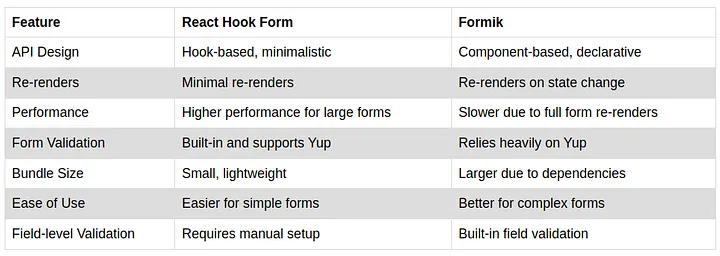
3. Key Differences Between React Hook Form and Formik
Now that we’ve explored both libraries, let’s compare them:
4. When to Use React Hook Form
- Performance: If your app has complex forms with many fields, React Hook Form is ideal because of its minimal re-rendering.
- Lightweight Projects: For small, lightweight applications or when performance is critical, React Hook Form is more efficient.
- Easy Setup: Beginners who prefer working with React hooks might find React Hook Form simpler to use.
5. When to Use Formik
- Complex Forms: For large-scale forms with advanced features, Formik provides more structure and control.
- Yup Validation: If you heavily rely on Yup for validation, Formik might be a better choice since it integrates seamlessly.
- Declarative Syntax: If you prefer a more component-based approach, Formik might be more intuitive.
Conclusion
Both React Hook Form and Formik are powerful form management libraries in React, each with its strengths. React Hook Form excels in performance and simplicity, while Formik offers a more structured approach for complex forms. The choice between the two ultimately depends on the complexity of your forms and your preferred development style.
If you’re building simple forms and care about performance, go with React Hook Form. If you need more control over validation and a structured approach for large forms, Formik is a better fit.
Happy coding!